Table of Contents
NEJE Max4 V2 Wiki
This page serves as the electronic installation guide, basic usage, and maintenance tutorial for the NEJE Max 4 V2 E80 Standard Kit.

Setup Guide
The goal of structural assembly is to unlock the NEJE Max 4 V2’s ultimate mechanical precision, stability, and motion performance. Renowned for its lightweight design, rigidity, and high motion capabilities, the NEJE Max 4 ensures that—once assembled—you can use appropriate parameters to verify device performance and confirm post-assembly reliability. Assembling the Max 4 V2 is simpler than the original model—follow these steps to complete the installation.
Assembly Instructions

1. Motorized Z axis
2. NEJE E80 Laser Module
3. Manual quick-release module height adjuster
4. Safety goggles
5. Short air nozzle – for cutting thick materials.
6. Replacement window lens, resistant up to 1000 °C, specially coated for 455 nm with high transmittance.
7. Wrench set
8. Wrench for adjusting the eccentric nut that sets roller clearance
9. Rail grease / Track lubricant
10. 12 V air-pump dedicated power supply—ensures the control system receives stable, independent power.
11. Air-pump
12. GaN 24V 5A power supply
13. Relay control module (Uses 12–24 V low voltage to switch high voltages up to 5–240 V; operate with caution.)
14. Control box
15. 6 mm air hose
16. Relay 2-pin control cable
17. USB cable
18. Door safety expansion interface
19. Y-axis belt tensioner
20. X-axis belt tensioner

step 1. The X-axis gantry is fully pre-assembled and function-tested; simply slide it into the Y-axis rail. Note the rail is marked for orientation—keep the CNC-machined surface facing up.
step 2. The lower rollers on the rail do not need to contact the frame tightly; a small gap is acceptable.
step 3. The control box and cables are pre-installed and tested; just slide the box into the rail and tighten the screws.

Pay attention to front and rear orientation: use socket-head (button-head) screws at the front and flat-head screws at the rear.

NEJE Max 4 V2 ships with the new motorized Z-axis module by default; you can customize the tool head to suit your process. Use the motorized Z-axis module alone, pair it with the quick-release height adjuster, or run both together—design your own mount via the standard interface!

The new motorized Z-axis delivers 20 mm of physical travel and 17 mm of effective working stroke in an ultra-thin, lightweight yet high-rigidity package. Height can be set manually or driven layer-by-layer through software, giving exact-focus control on fixed platforms and the ability to follow uneven surfaces for 3-D relief engraving, multi-pass cutting, or adding rotary tools, pens, plasma torches and other attachments.
The new motorized Z-axis uses a “no-physical-reset” technique—an algorithm detects motor position to achieve homing. If you prefer not to use the motorized Z-axis, you must flash new firmware to change the default settings; see the following guide for details: Motorized-Z-axis

The new Max 4 V2 features an improved belt-tensioner mounting design: the tensioner comes pre-assembled—simply slide it in, tighten two screws to secure, straighten and lock the timing belt, then manually adjust belt tension on the spot.

Install the timing belt as shown; this arrangement increases belt-wrap angle, lowers the center of gravity, and improves both response and vibration resistance.

1. Constant-tension timing-belt adjuster: simply compress the spring① by about 2 mm. Set constant tension manually by turning knob ③.
2. We only need to set the spring tension once; within the belt’s service life, simply loosen and retighten screw ② to restore tension after the belt ages.
3. Installing the new Y-axis belt tensioner is extremely simple—just tighten screw ⑤ and you're done.
4. ④ is the magnetic leveling structure.

Wiring is the final step. Max 4 V2 uses 15 × 20 mm quick-release cable chains—just lay the wires and air tube inside; plenty of spare room is reserved for future add-ons. Follow the illustration to finish the build. Tip: at the front of the X-axis where the Y and X runs meet, zip-tie both the cable and the tube so everything stays neat and rock-solid.

A. Safety key—turn right to enable.
B. Push-to-stop emergency button: press down to pause; press again to pop up and resume normal operation.
C. C1 user-defined button:
Long-press at power-up toggles between NEJE and GRBL mode.
One press: home the machine.
Next press: frame/outline the job.
Next press: start work.
Next press: pause work.
C1 is mainly used for stand-alone (offline) control.

1. DC 24 V 5 A; 12 V input is accepted, but standard 24 V is recommended to unlock full motion performance. Input voltage ① must equal module voltage ③④.
2. USB cable, The kit includes a high-quality, shielded USB cable. If you mainly cut and rarely engrave images, you can skip the USB connection and use NEJE’s built-in wireless instead—connect directly or via NEJE Bridge to LaserGRBL or LightBurn.
3. 4-pin PH2.0 laser output connector, Connection required.
4. 2-pin PH2.0 laser auxiliary power(Reduce current load to prevent power-line heating.), Connection required.
5. 4-pin PH2.0 X Stepper Motor, Connection required.
6. 4-pin PH2.0 YR Stepper Motor, Connection required.
7. 4-pin PH2.0 YL Stepper Motor, Connection required.
8. 4-pin PH2.0 Z Stepper Motor, Connection required.
9. “DOOR”: Connection required. Can be used to expand emergency-stop, safety-door, flame-detection and other safety functions.
10. “M7” : Can be left unused; typically reserved for expanding control of exhaust equipment.
11. “M8“: Connect to the relay module for air-assist control.
12. ”C1“ : Offline control, Connection required.
13. Independent A-axis port, 5-pin, supports NEJE R6 and is pre-configured for NEJE Max 4 V2—plug-and-play. The R6 comes with a long cable for direct connection. To connect third-party stepper-motor devices, purchase the 5-pin-to-4-pin stepper-driver cable separately (available at NEJE.SHOP). The independent A-axis port can also be expanded for advanced functions, controlled via Z-axis commands during special processes.
14. Bluetooth antenna.
Note: NEJE Max 4 V2 uses a “no-reset-button” homing technology—simply stick a 2–5 mm sheet of EVA or silicone at the travel limit and the axis will home smoothly and accurately. It’s more reliable and maintenance-free than the cluttered wiring and limited life of traditional mechanical switches.

NEJE Max 4 V2 uses a relay module to independently control the air pump; normally, you connect it to the mainboard’s M8 port and let NEJE or LightBurn decide whether to enable air-assist for each layer.
Working Platform

NEJE Max 4 V2 supports the knife-edge platform, honeycomb platform, and the expanded-area knife-edge platform kit. During actual operation, you’ll encounter tasks—like using the Blade or Drawing Pen—that require a flat surface and expanded workspace.

Once you set the platform height, you can preset the motor-driven Z-axis height and laser focus, making everything fully automatic from that point on. Focus

Once the workstation setup is finalized, simply configure the fixed initial laser position. This eliminates the need for repeated focal adjustments during subsequent operations. For example, as shown in the diagram, h₁-25represents the fixed focal point for the E80 laser module (non-adjustable), while h₂denotes the maximum travel range of the electric Z-axis. Users may customize h₁to any height within or beyond 17mm (using 17mm as an example here).
When working with materials, set the Z-offset parameter in software for each layer. For instance:
3mm material carving/cutting: Position the focal plane on the surface by setting Z-offset = 17mm (h₁) – 3mm (thickness) = 14mm.
5mm material carving: Typically place the focal plane on the material surface (Z-offset = 17mm – 5mm = 12mm).
5mm material cutting: Optimal focus is slightly above the center (Z-offset = 17mm – 3mm = 14mm).
For 3D engraving on 10mm material, incrementally lower the Z-axis per pass (custom Z-offset per depth). For 10mm cutting, use multi-pass strategies like:
2-pass cutting at 500mm/min:
First pass: Focus at 8mm (Z-offset = 17mm – 8mm = 9mm).
Second pass: Descend 1mm
This principle applies to both 10mm carving and thick-material cutting, requiring tailored focal adjustments based on material behavior and desired outcomes.
Both NEJE software and LightBurn support Z-offset adjustments, but LightBurn takes it further by enabling bidirectional vertical control through positive/negative Z-offset values. Users can delve deeper into customization, tailoring focus control to real-world applications and unleashing creative possibilities for precision and artistic expression.
Performance Testing
We usually test the smoothness of mechanical motion by drawing circles, and use rapid straight-line scans to check for wavy lines—this helps us assess equipment stability. You can start with this simple method to evaluate the machine’s mechanical condition. If you encounter different results, we’ll guide you through the corresponding troubleshooting steps.
Don’t worry—NEJE engineers have designed all the mechanical tuning to be simple, reliable, and easy to maintain.
Maintenance

Dust cleaning: regularly clean the dirt and dust on the tracks and wheels, and check the tightness of the timing belt.
Lens cleaning: Smoke from engraving or cutting, or oily air sources may contaminate the lens. After contaminating the lens, the lens will be broken due to the high temperature of the laser. It is recommended to use alcohol to clean the lens surface frequently;
Moisture-proof storage: If your laser machine is not used for a long time, we suggest adding some anti-rust oil to the metal places such as the screws and bearings of the machine to avoid metal rust, and store it in a dry environment.
Software & Firmware
Download
Max4 V2 × LightBurn Compatibility

Create Manually - GRBL

USB

Set work area to 720×450mm. If the machine is fitted with the Y-axis extension kit, set it to 720×1030mm. Note: 720 refers to the maximum usable X-axis travel, which may vary depending on laser module mounting position.

Origin Position: Select Front Left.


Optimize Z Moves: During continuous vector processing, the Z-axis will not repeatedly lift and lower. It only adjusts height once according to the Z value set for each individual layer. You may disable this option when using drag knife or pen tools.

Enable GCode Clustering: NEJE firmware supports G-code clustering, which works well for high-speed engraving on Max4 V2. It is recommended to keep this enabled by default.
Return Position: It is recommended to set the coordinate to X0 Y450, which is where the laser head parks after completing jobs. Users may customize this coordinate as needed.

$REC/AutoRun $REC Auto/Run
$REC/AutoStart $REC Auto/Start
Offline Hotkey Configuration NEJE firmware features exclusive offline functions designed for LightBurn. Send this command before starting your job to transfer the full G-code file to the machine first. Once the transfer finishes, you may close LightBurn and disconnect the USB cable, and the NEJE machine will run the job automatically. You can also control the machine via LightBurn (such as pausing or stopping) while processing is underway. This configuration also works with LaserGRBL software.
Firmware Update
NEJE firmware updates can be performed via the NEJE Win software. This tool is useful if you modify machine settings and do not know how to restore the original parameters. Additionally, NEJE firmware receives regular updates with new features to improve the overall user experience of the device.
Wireless NEJE Connection: LightBurn & LaserGRBL
GRBL Configuration
This operation is completed using LaserGRBL's configuration functions, mainly for users who want to customize advanced underlying features of GRBL and the machine.
Other Functions
New NEJE Firmware Adds Real-Time Temp Readout & 50°C Overheat Auto-Stop Protection
The NEJE Max4 V2 is primarily designed to work with LightBurn for high-performance and complex tasks. NEJE software and firmware have undergone extensive optimizations to enhance user experience and operational efficiency when controlled via LightBurn. While the NEJE Max4 V2 also supports operation through the NEJE APP, most users of this model use it to create sophisticated professional projects. Therefore, features related to the NEJE APP, NEJE desktop software and LaserGRBL will not be covered in detail here.
Expansion Accessories
E80 Laser Module
E80 stands out for its unmatched blend of productivity and artistic creativity, delivering highly efficient processing for large-format or batch projects. From large-area wood deep engraving and 3D relief carving (high material removal) to plywood cutting (3mm @ 900mm/min) and image engraving (1000mm/s), its advanced lens technology enables a 90-micron high-energy cutting head—the ultimate tool for achieving precision and creativity in both artistic and industrial applications.
Why NEJE E80 Outperforms 70–100W Generic Lasers: The Game-Changing 4×FAC Optical Route

Attention
This is not a consumer-grade product. The kit ships with the high-performance NEJE E80 455nm laser module as standard, but it can also accept the NEJE E40, NEJE E30, 24 V 1064 nm, Blade, Drawing Pen, and CNC plasma modules for artistic creation and production. During operation, strictly follow the safety precautions below.
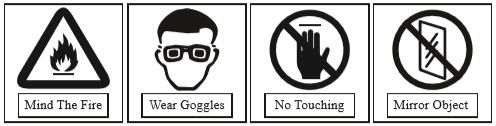
For your first learning session, it’s recommended to practice with the machine while the laser is powered off, using tool heads such as the Blade or Drawing Pen.
Please wear protective glasses before operation!(The E80 module operates at a wavelength of 455 nm. After the device is powered on, the module will emit a low-power laser for positioning indication—this is normal. The E80 module’s air nozzle is equipped with a physical shield; when operating outdoors without an enclosure, always wear proper safety goggles.)
Please avoid strongly impact on the machine!(The device has a built-in MEMS vibration sensor; this safety feature is triggered only when the machine is moved or when ambient vibration becomes excessive, and the detection sensitivity can be customized.)
Laser processing of certain materials can generate dust or toxic gases; always consult the relevant safety data and take appropriate precautions in advance. For long-term use, a DIY enclosure tailored to your application is recommended—ensure effective fume extraction is in place.
Please pay attention when working with flammable materials: improper speed or focal settings, as well as mechanical faults, can ignite the material—especially when cutting thick wood. Engraving mode and thin-material cutting are comparatively safer; stay near the machine whenever you lack experience.
When operating in an open environment, keep pets away and prevent them from coming into contact with the machine.
To expand plasma-cutting functionality, you must control the plasma on/off through an M8-interface relay module. This requires considerable modification skills—proceed with caution.
Please do not touch the laser outlet with your hands. It may burn your hands!
Children under 14 years of age are prohibited from using this product!
Children over 14 years of age need adult supervision when using this product!
E40 Laser Module
The E40 is a 12V module yet compatible with the Max4 V2 platform! The E40 supports an input voltage range of 12–24V. Its fan is rated for 12V only but can withstand 24V for short periods. All NEJE modules adopt dynamic speed regulation; fan operation is controlled by PWM signals and module temperature, which greatly reduces noise. For engraving-only tasks, the module temperature rarely rises high enough to trigger sustained high-speed fan rotation. Therefore, under normal light-duty use, the E40 can be directly connected to the 24V NEJE Max4 V2 system without issues. The same applies to the A40640 module—neither will get damaged. However, prolonged continuous full-load operation may shorten the fan’s service life. Compared with the E80 module, the E40 delivers a high resolution of approximately 500 DPI, enabling fast engraving of highly detailed artwork on the Max4 V2 platform.
A40640 Laser Module
The A40640 is a variable-focus laser module that offers outstanding flexibility and versatility and can be operated without an additional air assist unit. In my opinion, its most impressive feature is its long focal position, which delivers a scanning spot of 0.04 × 0.2 mm. When engraving spray-painted artwork, it scans rapidly like a broom while maintaining the energy density of a compact flat focal spot for exceptional working efficiency. Furthermore, this module likely boasts the longest focal length available on the market. When engraving large-format pieces at long focal distances, focal variations caused by uneven surfaces are minimized, resulting in consistent engraving across the entire image. The long focal range also accommodates curved materials, enabling uniform engraving on surfaces with height deviations of ±3 mm. While its rated operating voltage is 12 V, it is also compatible with the 12–24 V Max4 V2 system, operating on the same voltage regulation principle as the E40 module.
NEJE S1 IR Laser
coming soon》》》
This NEJE 3W 1064nm infrared laser module features an ultra-precise 0.03×0.03mm focal spot that enables sharp engraving of tiny 0.5mm letters on metals. Equipped with upgraded pulsed energy and a 24V input design, it can cut 0.5mm stainless steel sheets and create deep grooves on stainless steel, aluminum, copper and other metals. It supports plug-and-play installation and is fully compatible with NEJE Max4 and Max4 V2 engraving machines.
E30 Laser Module
The E30 is a blue laser diode module with ultra-high resolution, delivering distinctive engraving effects on wooden artworks. It requires no air assist and features a rear smoke exhaust design.
Although the E30 is a 12V module, it is also directly compatible with 12–24V systems, following the same principle as the E40.
Blade Extension
The NEJE Blade accessory leverages the precise large-format CNC structure of the Max4 V2 to deliver intricate cutting over a wide working area. It can process materials such as heat transfer paper and glass advertising stickers. Simply disable the optimized Z-axis function during operation.
Drawing Pen
A variety of drawing tools including colored pens and pencils are optional. NEJE is equipped with ballpoint pens featuring built-in spring buffer structures, suitable for rapid drafting of large-size engineering drawings and structural art creation. When using hard colored pens, prepare a solid flat board and lay a 2–3 mm thick felt mat on its surface to absorb the downward pressure exerted by the pen tip.
Area Extension
The extended rail comes with a matching timing belt as a gift. Refer to the machine installation instructions above for the installation procedure. Be sure to tension the timing belt properly: use the tensioner to stretch the spring and tighten the timing belt, then lock the side screws. This achieves the optimal working condition.
After installing the extended rail, you need to modify the work area settings in LightBurn. Follow the steps below.


Case DIY
Enclosure design must account for key factors such as operational convenience, functional requirements, safety, noise reduction, stability, and airflow. These considerations are shaped by the specific application and environment. Users can DIY tailored solutions optimized for their unique usage scenarios. NEJE will also continue to provide a variety of reference solutions for users.
 Hello,I have made some small improvements to my Elena's Box, handles to lift the honeycomb table, red corners of the drawer so that they are easily visible, logo on the inside, change of color of the smoke extraction collector, although I have some doubts about whether to install linear actuators or not, the ones that would work well are quite expensive and perhaps with a simple counterweight I will also achieve agility to open and close the lid. What do you think?
https://youtu.be/556GoL-P2DE
Hello,I have made some small improvements to my Elena's Box, handles to lift the honeycomb table, red corners of the drawer so that they are easily visible, logo on the inside, change of color of the smoke extraction collector, although I have some doubts about whether to install linear actuators or not, the ones that would work well are quite expensive and perhaps with a simple counterweight I will also achieve agility to open and close the lid. What do you think?
https://youtu.be/556GoL-P2DE


NEJE provides an external frame, which not only can collect exhaust gas and fire protection functions, but also can install cameras when the area is expanded.
Air Assist Valve

①. Connect the relay module and control it via the M8 interface. ②. Supply oil-free, water-free compressed air at high pressure. ③. Integrate into the existing air assist system.
High-pressure air assist is primarily used in high-volume cutting applications. By filtering oil and water from compressed air, the high-pressure gas can be integrated into a low-pressure system by incorporating the electromagnetic valve assembly mentioned above, enabling a dual-gas-assist setup (high-pressure + low-pressure). For users with lighter cutting demands, this component may not be necessary—it enhances cutting quality and efficiency only when needed.
A standard air assist kit primarily protects the lens. Under normal circumstances, a cutting speed of 500 mm/min is sufficient for materials up to 3 mm thick. High-pressure air assist (≥30 psi) improves efficiency, reduces carbonized residue during MDF and ≥3 mm wood cutting, and yields cleaner edges.
R6 Rotary Attachment
The NEJE Max 4 V2 is a standalone A-axis that can be easily configured with the rotation axis function by setting it in the lightburn software. You don't need to use the Y, Z axes as rotation axes When configuring the rotation axis, you need to first position the Y axis to the specified position, and then start the A axis. You need to remember that when using the A axis, you need to multiply the actual object diameter by a fixed parameter as the input diameter.
Camera
The NEJE Max4 V2 is available with the blade cutting platform accessory, allowing users to set a relatively fixed visual area when configuring an extra-large working space. It delivers relatively accurate visual positioning on thin materials to streamline your creative workflow.
Troubleshooting
Why Stepper Motors Lock & How to Disable?
What improvements does the Max4 V2 offer compared to the Max4?
Why is the cooling system of a diode laser module designed to be external?
Materials, Parameters & Video Tutorials
If you cannot find the material parameters and processing effects you need here, please submit the material you wish to test on the NEJE Forum. We will record a video and send you the test results promptly.

